 客服热线:
 手机版
 二维码




































Bolly BB Trading
Bolly BB Trading Utility plus Symbol and Time-frame Changer) is a manual trading expert built for the Traders using Bollinger bands for trading.
It is useful particularly when Bollinger band squeezes and about to explode.
How to use:
- When Bollinger band squeezes, you will attach it to your chart ready for a trade when the Bollinger band expands.
- It will automatically place Buystop order at the upper band of Bollinger band plus the distance defined by the user to
filter out fake-breakouts that may open useless trades in readiness for a break upward of the price
WHEN you click the Open Buystop and Sellstop Orders button on the Chart.
- . The same thing for Sellstop order at the lower band of Bollinger Indicator plus the distance to be defined by the user.
- It can also place pending orders by Current price plus a distance defined by the user.
- It can also place pending orders based on the user's own defined price by entering desired price in the fields provided in the parameter
setting.
- Then it will use the opposite lines as the Stop-loss for each pending order plus a few pips as defined.
- Then click the appropriate button on the chart to execute your pending orders in readiness for a break of price to any direction it wants and it will take you into a profitable trade.
- It can also place both Take-profit and Stop-loss by itself if the fields are empty based on user's preferences.
Parameter Settings:
- Magic number to select orders for sole operation
- Default lot size
- Trade panel up and down shift
- Trade panel left and right shift
- Open Buystop order (option)
- Open Sellstop order (option)
- Use Bollinger Bands for order opening
- Use Current price for order opening
- Use User's self-defined prices for order opening
- Enter self-defined price for Buystop
- Enter self-defined price for Sellstop
- Distance from the price or BB bands (to be defined by the user)
- Take-profit value
- Stop-loss value
- User's self-defined Buystop stoploss
- User's self-defined Sellstop stoploss
- Safe-gap for Buystop stoploss
- Safe-gap for Sellstop stoploss
- Spread added for Breakeven
- Use Breakeven (option)
- Breakeven point desired by the user
- Profit level to trigger Trailing Stop
- Enable Trailing stop
- Trailing stop points
- Points to trail the price behind as it moves
- Days for pending orders to expire
- Activate Opposite order to be closed when one is opened
- Close ALL orders
- Changer's buttons in an horizontal row
- Changer's left and right shift
- Changer's up and down shift
- Changers' buttons' width
- Changers' buttons' height
- Changer's front size
- Changer's button color
- Changer's button border color
- Changer's text color
- Changer's selected button's color
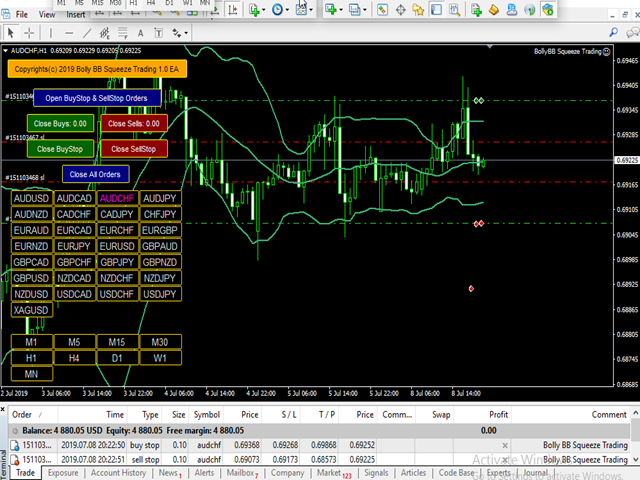
Buttons on the Chart:
- Open Buystop and Sellstop
- Close Buys with brief account report
- Close Sells with brief account report
- Close Buystop
- Close Sellstop
- Close All Orders (Pending orders and currently opened orders)



本店最新上架
-
- MT4 MT5跟单EA 本地跟单远程跟单 绝不

- ¥1100.00
-
- 在MetaTrader市场购买MetaTrader 5的&#

- ¥3988.00
-
- 在MetaTrader市场购买MetaTrader 5的&#

- ¥3988.00
-
- 在MetaTrader市场购买MetaTrader 5的&#

- ¥3988.00
-
- 在MetaTrader市场购买MetaTrader 5的&#

- ¥3988.00
全网为您推荐
-
- AlgoTradeSoft

- ¥3988.00
-
- 国际期货套利软件

- ¥3988.00
-
- MT4 MT5跟单EA 本地跟单远程跟单 绝不
- ¥1100.00
-
- 在MetaTrader市场购买MetaTrader 5的&#
- ¥3988.00
-
- 在MetaTrader市场购买MetaTrader 5的&#
- ¥3988.00


