 客服热线:
 手机版
 二维码





































One Click Trades Panel Premium
oneClick Trades Panel - Premium Version 1.0
oneClick
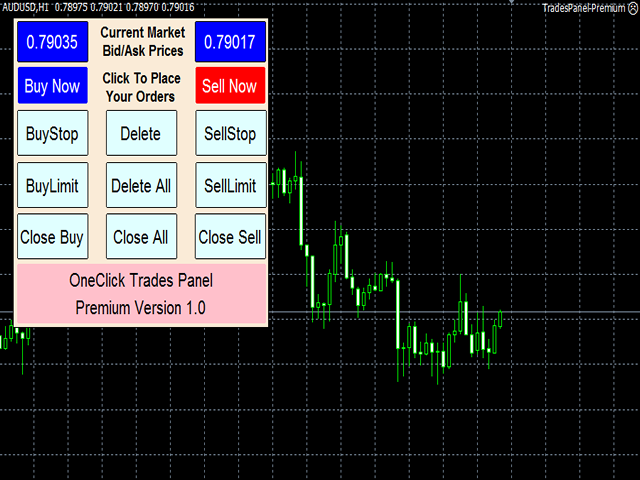
Trades Panel - Premium Version 1.0 is an higher grade of the 3 Trades Panels created. This version includes a lot of features that makes
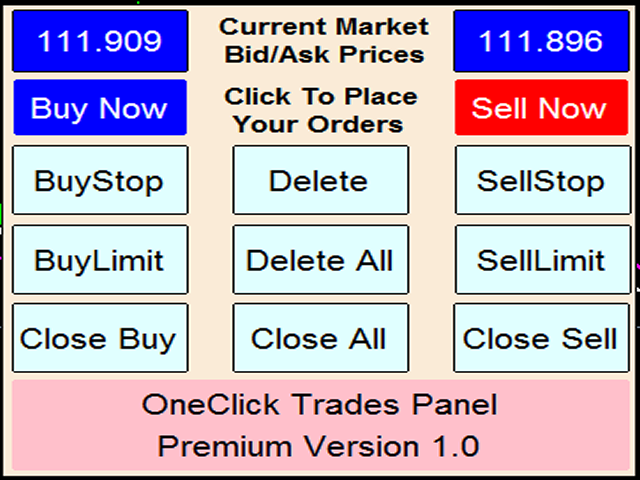
trading an exciting experience. Although It has same features on the interface as that of the Standard version but it also has almost 30 features behind the window chart.
Interface Buttons Features:
- Buy button: This is a button used to open a buy trades
- Buy-Stop button: This is a button used to open buy stop orders
- Buy-Limit button: This is a button used to open buy limit orders
- Sell button: This is a button used to open sell trades
- Sell-Stop button: This is a button used to open sell stop orders
- Sell-Limit button: This is a button used to open sell limit orders
- Close Buy button: This is a button used to close buy trades
- Close Buy-Stop button: Used to close buy stop orders
- Close Buy-Limit button: Used to close buy limit orders
- Close Sell button: This is a button used to close sell trades
- Close Sell-Stop button: Used to close sell stop orders
- Close Sell-Limit button: Used to close sell limit orders
- Close All: This is a button to close all opened orders at once without having to close each order one by one.
- Delete Sell-Stop: Used to delete all sell stop orders not triggered
- Delete Buy-Stop: Used to delete all buy stop orders not triggered
- Delete All: Used to delete all sell stop, buy stop, sell limit and buy limit orders not triggered
External Parameter Settings:
- Breakeven = This one removes stop loss and place it a few pips above the open price to remove risk totally from trades already opened.
- Trailing Stop = This one moves after the price as it goes positively in the Trader's way to protect already made profits as defined by the Trader.
- Auto-stop loss = Automatic stop loss to be set upon trades opening by the system itself in a safe distance.
- Manual stop loss = If this is greater than zero, it will disable the auto-stop loss to enable the Trader to set his/her desired stop loss.
- Auto-Parameter settings = This one can enable or disable auto-parameter settings configured as default settings for most of the parameters to save the Trader from unconscious wrong decision.
- Stop or pause trading = To stop EA from operating for a while or permanently depends on your preference at the time.
- Safe-gap for auto-stop loss = Safe-gap between the original stop loss and this level will safe your trade from price retesting the highest-high or lowest-low and avoid cutting you out of the market before the price resume the current direction.
- Daily percentage of account balance you desire as profit, after which the EA will close all orders till the second day.
- Daily Risk = Amount you are ready to lose if things get worse, after which the EA will close all orders till the second day.
- Daily profit in dollar = Amount you desire to gain as profit, after which the EA will close all orders till the second day.
- Risk Reduction = This one will reduce the stop loss level when the price has reached the level preset by the trader.
- Risk reduction level definition = The level of price at which you want your stop loss reduced.
- Profit Locking/Protection = This one will protect the profit already made when the price has positively reached the level preset by the trader.
- Profit level to be protected = This defines the level of profit to be locked in should in case the price might turn back.
Usage for effectiveness:
This software responds instantly when any of the buttons is clicked if used with good internet connection. If any button is clicked and it didn't open any trade, hold on and check your internet connection, don't click more than once until you are sure that the one command you gave to open or close trade actually failed due to poor internet connection to avoid opening several unwanted trades! If then internet connection is good but it didn't open on time, then it is due to the state of then server, don't try to click on it again because there is every possibility that the order you made has been accepted by the server but yet to be established. Following this simple instructions will save you of opening several unwanted orders.
On the other hand, if you click and it didn't respond, check if you have ticked 'Allow trading' in the option menu or 'Allow Automated Trading'.
本店最新上架
-
- MT4 MT5跟单EA 本地跟单远程跟单 绝不

- ¥1100.00
-
- 在MetaTrader市场购买MetaTrader 5的&#

- ¥3988.00
-
- 在MetaTrader市场购买MetaTrader 5的&#

- ¥3988.00
-
- 在MetaTrader市场购买MetaTrader 5的&#

- ¥3988.00
-
- 在MetaTrader市场购买MetaTrader 5的&#

- ¥3988.00
全网为您推荐
-
- AlgoTradeSoft

- ¥3988.00
-
- 国际期货套利软件

- ¥3988.00
-
- MT4 MT5跟单EA 本地跟单远程跟单 绝不
- ¥1100.00
-
- 在MetaTrader市场购买MetaTrader 5的&#
- ¥3988.00
-
- 在MetaTrader市场购买MetaTrader 5的&#
- ¥3988.00


