 客服热线:
 手机版
 二维码






































FxMail Reader
Abstract:
I want to introduce one of the most useful robots in the forex market; this robot can check your mailbox, find specific mail content, and receive forex trading signals, and finally do trade automatically. Our product has professional text analyzer that can detect symbol, signal type, and pass these information to Expert engine for automatic trading.
Why you need to use my product:
In this part, I want to explain my product benefits. Are you one of the customers that receive signals from forex signal providers and you receive forex signals via email? Actually, you want to test these signals or do real trade. You must do that manually by checking your mailbox 24/7. Everybody knows this is a very hard task. This robot allows you to sit back and drink your coffee while your mailbox checks every second and when the new signal received, EA trade automatically.
Main functions:
- Automatically Read Forex Signal from your email content (No matter what is the structure just need Pairs and Orders)
- No DLL needed
- Works with Gmail, Yahoo, Hotmail and Outlook email providers.
- Automatic/ Manual trading option
- Trade time filter
- Trading Options Like SL, TP, Lot size,…
User Guide:
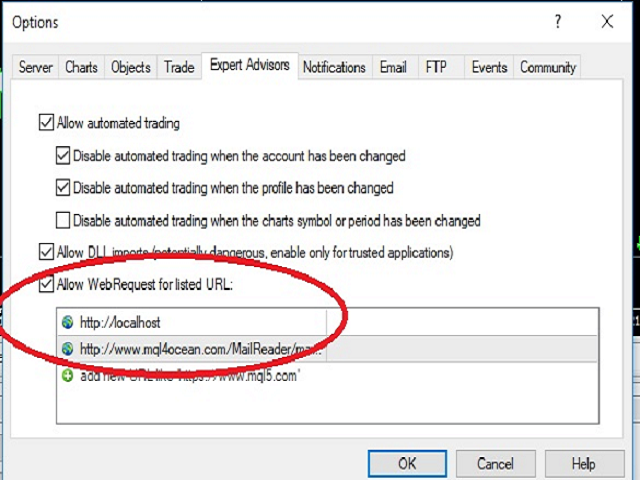
- 1) Add our URL in your MT4 Broker Terminal ("This URL is our web service that use for reading email"):
Go to: Tools --> Option --> Expert Advisors --> Web Request List
Add URL:http://www.mql4ocean.com/MailReader/mailreader.php
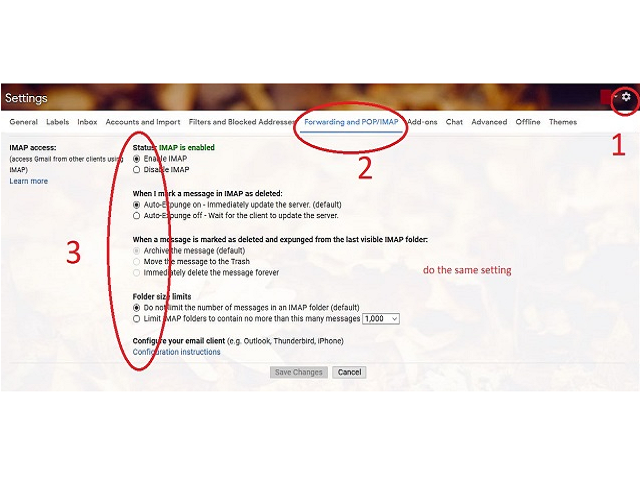
- 2) Configure Email Setting to Ready for Connection ("These settings are necessary for ability to read your email inbox "):
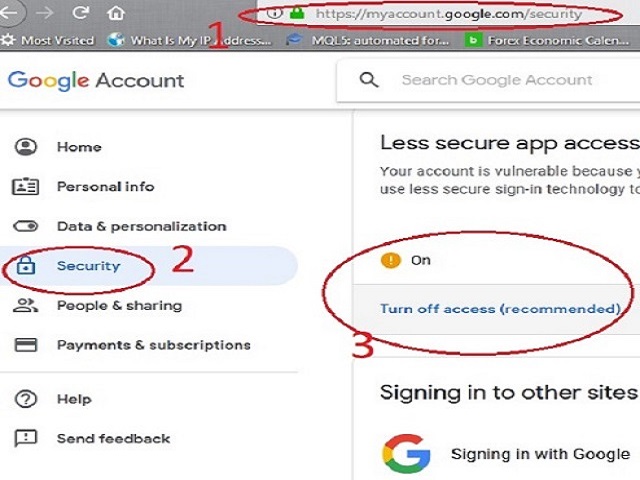
Gmail: log in to your email address then:
1st: go to: https://myaccount.google.com/security --> less secure app access -->Turn on access
2nd: go to: Setting --> Setting --> forwarding and pop/imap -->IMAP access: Enable IMAP
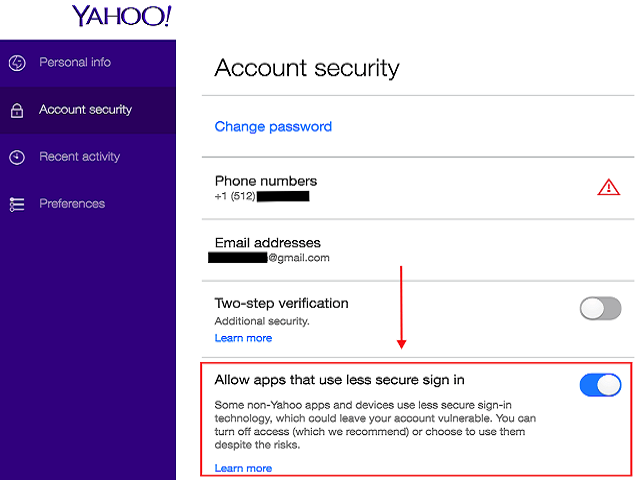
Yahoo: log in to your email address then
1st: go to: https://login.yahoo.com/account/security --> Allow apps that use less secure sign in--> on
Hotmail/Outlook: No additional Configuration Needed
- 3) Run Fxmail Reader and fill the setting:
Input parameters description:
Here you can learn how to set the correct input setting; you can find all definitions here.
• Trade Mode: You have the ability to choose an auto mode or manual mode, in manual mode, EA will ask you before do any automatically action. In addition, in auto mode, EA will activate automatically.
• Fix Stop Loss: Fix Stop Loss in Point unit, 0 means disable.
• Fix Take Profit: Fix Take Profit in Point unit, 0 means disable.
• Maximum Order: Maximum allowed trade on each symbol.
• Magic Number: trade magic numbers.
• Fix Lot Size: fix lot size.
• Rescan Mail Every (Second): scan server to recheck your mail inbox every x second.
• Email Provider: email provider, you can choose your provider in drop down box.
• Your Email Address: email address must be here by this format username@xxx.com.
• Your Email Password: email password.
• Signal Email Subject-Keyword: Email subject keyword that helps EA to find it faster.
• Signal Email Sender Name: Email sender name.
• Content Buy Keyword: Buy signal text keywords like that (Buy, Long,).
• Content Sell Keyword: Sell signal text keywords like that (Sell, Short,).
• Maximum Spread: Maximum Allowed Spread.
• Start Trade Hour: Start Trade Hour (to avoid bad time trading).
• Start Trade Minute: Start Trade Minute (to avoid bad time trading).
• Stop Trade Hour: Stop Trade Hour (to avoid bad time trading).
• Stop Trade Minute: Stop Trade Minute (to avoid bad time trading).
Next release goal:
I am working hard in whole communication between meta trader and third party software. I try to add more abilities to connect EA like that live communication by news web sites and different signal providers or social apps.
本店最新上架
-
- MT4 MT5跟单EA 本地跟单远程跟单 绝不

- ¥1100.00
-
- 在MetaTrader市场购买MetaTrader 5的&#

- ¥3988.00
-
- 在MetaTrader市场购买MetaTrader 5的&#

- ¥3988.00
-
- 在MetaTrader市场购买MetaTrader 5的&#

- ¥3988.00
-
- 在MetaTrader市场购买MetaTrader 5的&#

- ¥3988.00
全网为您推荐
-
- AlgoTradeSoft

- ¥3988.00
-
- 国际期货套利软件

- ¥3988.00
-
- MT4 MT5跟单EA 本地跟单远程跟单 绝不
- ¥1100.00
-
- 在MetaTrader市场购买MetaTrader 5的&#
- ¥3988.00
-
- 在MetaTrader市场购买MetaTrader 5的&#
- ¥3988.00


