 客服热线:
 手机版
 二维码





































News Premium EA
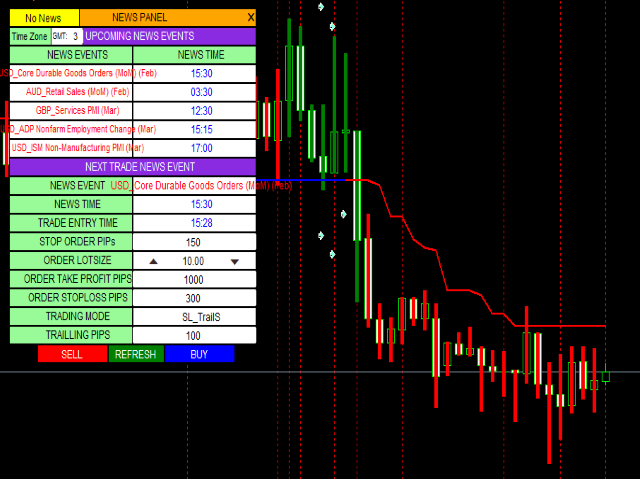
The robots uses the FUNDAMENTALS strategy used by most successful traders and it only trades when there is a news event. The robot also provide the trader with options of changing lot size, using stoploss, takeprofits and trailing stops. The news events are downloaded automatically from investment.com economic calender by the robot and displayed on the screen in the panel. The trader needs to ensure that the internet is connected before its news time. The robot will display in the top left corner of the panel when its news time, when loading news and when there is no news. The robot displays “News Time” 2 minutes before the news hour. The robot always take care of the news 2 minutes in advance.You only need to place the robot on one chart window because the robot automating changes the currency pair to suit the next news event currency. The trading panel is displayed under screenshots
NB: For accurate strategy tester results, only test the news data for the current week preferable when its Thursday or Friday in your country. The economic news older than a week can not be downloaded from the news source. A also set the Use_Test_Indicator to false to only test the news events. Also ensure that your chart time matches your time zone time. Add one to your time zone if the chart time is ahead of your time by 1 and vise verse.
ROBOT INPUTS
You can change these inputs at anytime
Time Zone: The trader must enter the time zone used in his country. By default this value is set to 2 for the Namibian time zone, Click on the number to change it.
Order LotSize: The trader should ensure that the lotsize is set right for his/her account equity. The value is set to 1 by default but the trader can change this by clicking on the value or by using the up and down arrow.
Order Take Profit PIPs: The trader can change this value to his/her desired take profit point level. The recommended value is 1000 points, to change it, click on the default value.
Order Stoploss level: The trader can change this value to his/her desired take profit point level. The recommended value is 250 points, to change it, click on the default value.
Trailing: The robot locks in profits equivalent to the Trailing points and activate the trailing stop. This value is 100 by default by the trader can change it to his desire value.
TRADING MODE: This gives options to the trader on how you want to control your open trades. Those options includes; OpenTrade, SL_TrailS, TP_TrailS, TP_SL_Only, TP_SL_TrailS. These options will be describe here. To change the mode, hover your cursor to the current mode and click, the next mode will display. We recoment to set this to SL_TrailS.
OpenTrade Allows you to trade with no stoploss and no take profit. The trader may close his/her trades manually.
SL_TrailS Allows you to use stoploss and trailing stop only. Indicate the trailing pips by Changing the TrailPPS value or use the default value.
TP_TrailS Allows you to use take profit and trailing stop only(no stoploss) but locks in profits.
TP_SL_Only Allows you trade with take profit and stoploss only. No trailling stop will be used.
TP_SL_TrailS Allows you trade with take profit, stoploss and Trailling stop.
ROBOT BUTTONS
BUY: Click to place a Buy order. Specify TP and SL if the TRADING MODE is not OpenTrade. Also check the lotsize (LOT).
SELL: Click to place a Sell order. Specify TP and SL if the TRADING MODE is not OpenTrade. Also check the lotsize (LOT).
Refresh: Click on this button to update news from internet. Also, if there is no news displayed in the table, clicked on the refresh button to load the news.1. In your meta Trader 4, go to Tool>Options>Expert advisors. Check the “Allow WebRequest for listed URL” box
2. Add the following URLs in the space below the checked box:
http://ec.forexprostools.com and
https://www.google.com/finance
本店最新上架
-
- MT4 MT5跟单EA 本地跟单远程跟单 绝不

- ¥1100.00
-
- 在MetaTrader市场购买MetaTrader 5的&#

- ¥3988.00
-
- 在MetaTrader市场购买MetaTrader 5的&#

- ¥3988.00
-
- 在MetaTrader市场购买MetaTrader 5的&#

- ¥3988.00
-
- 在MetaTrader市场购买MetaTrader 5的&#

- ¥3988.00
全网为您推荐
-
- AlgoTradeSoft

- ¥3988.00
-
- 国际期货套利软件

- ¥3988.00
-
- MT4 MT5跟单EA 本地跟单远程跟单 绝不
- ¥1100.00
-
- 在MetaTrader市场购买MetaTrader 5的&#
- ¥3988.00
-
- 在MetaTrader市场购买MetaTrader 5的&#
- ¥3988.00


