 客服热线:
 手机版
 二维码






















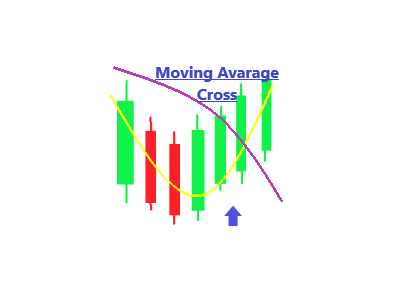














Sansa MovingAvarage Cross
Description in English and Italian=
This Indicator is based on the cross of two Moving Avarage, and gives you the signal of Buy and Sell when they Cross, with Arrows and alerts.
What’s the best about it? You can set up the two Moving Avarage just as you need!
When you attach the indicator on the chart , a window will open where , in the INPUT section, you can choose the MATimeframe(H1,H4,M30 ....), the MaMethod ( Simple, Exponential.....),SlowMa Periods( 50 as Default but you can manually change the number ), FastMa Periods(1 as Default but you can manually chande the number).
SIGNAL INPUT=
· BUY= when FastMa cross above the SlowMa, the indicator will draw a Blue Arrow and the alert will have the Symbol and the Signal Exaple= “BuyEURUSD”;
· SELL= when FastMa cross below the SlowMa , the indicator will draw a Red Arrow and the alert will have the Symbol and the Signal Example= “SellEURUSD”;
INSTALLATION=
Simply attach this indicator to the chart window of currency pairs, a window will open , in the INPUT SECTION you will find all the variable of the MA that you can change;
Double click to the MATimeframe, MaMethod, SlowMaPeriods, FastMaPeriods, to change the default setting with the value you need.
Questo indicatore è basato sull’incrocio di due Moving Avarage, e da il segnale di Buy e Sell quando si incrociano con delle frecce e degli Allarmi.
Qual è la cosa migliore di questo indicatore? Puoi impostare le due Moving Avarage proprio coma hai bisogno!
Quando attaccherai l’indicatore al grafico, si aprirà una finestra dove, nella sezione VALORI DI INPUT, puoi scegliere MaTimeframe(H1,H4,M30….), MaMethod(Simple, Exponential….) il periodo della SlowMa(50 di default ma lo puoi cambiare manualmente), il periodo della FastMa(1 di default ma lo puoi cambiare manualmente).
SIGNAL INPUT=
· BUY= quando la FastMa incrocia dal basso verso l’alto con la SlowMa, l’indicatore disegnerà una freccia Blu e si aprirà un Allarme con il Simbolo e il Segnale Esempio=”BuyEURUSD”;
· SELL= quando la FastMa incrocia dall’alto verso il basso con la SlowMa, l’indicatore disegnerà una freccia Ross e si aprirà un Allarme con il Simbolo e il Segnale Esempio=”SellEURUSD”;
INSTALLATION=
Attaccare semplicemente l’indicatore al grafico, si aprirà una finestra, nella sezione VALORI DI INPUT, troverai tutte le variabili degli Ma che puoi cambiare;
Fai doppio click su MaTimeframe, MaMethod,SlowMaPeriods, FastMaPeriods, per cambiare i valori di default con i valori che preferisci.


本店最新上架
-
- MT4 MT5跟单EA 本地跟单远程跟单 绝不

- ¥1100.00
-
- 在MetaTrader市场购买MetaTrader 5的&#

- ¥3988.00
-
- 在MetaTrader市场购买MetaTrader 5的&#

- ¥3988.00
-
- 在MetaTrader市场购买MetaTrader 5的&#

- ¥3988.00
-
- 在MetaTrader市场购买MetaTrader 5的&#

- ¥3988.00
全网为您推荐
-
- AlgoTradeSoft

- ¥3988.00
-
- 国际期货套利软件

- ¥3988.00
-
- MT4 MT5跟单EA 本地跟单远程跟单 绝不
- ¥1100.00
-
- 在MetaTrader市场购买MetaTrader 5的&#
- ¥3988.00
-
- 在MetaTrader市场购买MetaTrader 5的&#
- ¥3988.00


