 客服热线:
 手机版
 二维码





































Hunter bot PriceLines Extra
Attention! Advisor is under development. The results of inspections showed the possibility of making a profit in a limited time interval!
For a start, you can install the trial version of the Expert Advisor Hunter bot PriceLines Lite, which will work on a real account with a minimum lot (and therefore with minimal risk).
In this, the main version, all settings are available.
EA is designed for fully automated trading. It spelled out the function of protection against most errors.
This robot-development Advisor Hunter on the channel breakout Bot.
The EA calculates the channel width and places pending orders BuyStop and SellStop according to the specified settings. Pending orders can be placed at a specified distance from the channel boundaries. This distance is set in the parameters in points from the calculated channel width.
The time of placing pending orders is set in the EA parameters. The parameters also specify the time when not triggered pending orders should be deleted.
The EA distinguishes between two-three - and four-five-digit quotes. In the parameters, the values are specified in points (second or fourth decimal place).
The EA works on any instrument and with any period (TF).
Configurable parameter
- Size of the first bet, lots - size of the first order bet in lots
- Set maximum risk per trade (0=OFF) - setting risk per trade as a percentage of available funds
- Marginale Factor with bet 2 (Lots2=Lots1*Factor2) - the magnification ratio of the second lot
- Marginale Factor with bet 3 (Lots3=Lots2*Factor3) - the magnification ratio of the third lot
- TakeProfit level, pips - profit size for each order in points
- StopLoss level, pips - stop size for each order in points
- Indentation from the channel, pips - the shift from the channel in paragraphs
- Time of placing trades (for AUTO mode) - time of placing pending orders (hour: min) - server time
- Time of removal deals (for AUTO mode) - time to delete pending orders (hour: min) - server time
- To send the expiry date - send pending orders expiration time to the server (set to False if error 147 is received)
- Number of calculation points zigzag - the number of the zigzag reference points for plotting the channel
- Slippage, pips - slippage (parameter for placing orders)
- Room Advisor - the number of the EA (magic)
- Depth - the setting of the zigzag indicator (see below)
- Deviation - the setting of the zigzag indicator (see below)
- Backstep - the setting of the zigzag indicator (see below)
- Arrow color orders BuyStop(Blue) - the color of the arrow BuyStop orders (no arrows by default)
- Arrow color orders SellStop(Red) - the color of the arrow SellStop order (no arrows by default)
- Transfer to break-even (0=OFF), pips
- Minimum profit when break-even, pips
- Trading from price lines by automatically - permission to open new orders (on/off)
- Close all orders when receiving a profit as a percentage of the Deposit - close all orders when receiving a profit as a percentage of the Deposit
- Trailing profit (on/off)
- Profit trailing percentage of all orders, %
- Show Comments
- Show alert - permission to display pop-up messages
By the way: Depth - this is the minimum number of bars, which will not be the second high/low less/more Deviation pips than the previous one. Backstep is the minimum number of bars between highs / lows.
Comment
The EA displays the following comment in the upper left corner of the active chart:
- the name of the EA
- main parameters
- calculated channel width and offset
- account balance
- available funds
Example
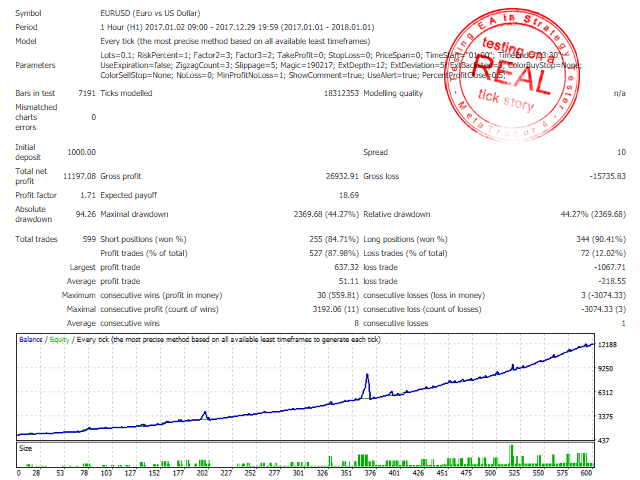
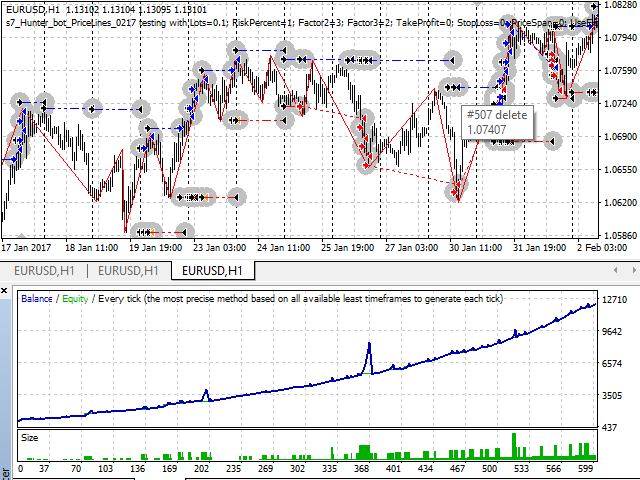
The first figure is an example of using an advisor on a real account. The rest of the figures show an example of setting up an adviser and checking it in the strategy tester. Testing was carried out on real ticks. For the test period is taken for a month and a year. Parameters are set without optimization: RiskPercent=1; TakeProfit=0; StopLoss=0; PriceSpan=0; TimeStart="01:00"; TimeEnd="23:30".



本店最新上架
-
- MT4 MT5跟单EA 本地跟单远程跟单 绝不

- ¥1100.00
-
- 在MetaTrader市场购买MetaTrader 5的&#

- ¥3988.00
-
- 在MetaTrader市场购买MetaTrader 5的&#

- ¥3988.00
-
- 在MetaTrader市场购买MetaTrader 5的&#

- ¥3988.00
-
- 在MetaTrader市场购买MetaTrader 5的&#

- ¥3988.00
全网为您推荐
-
- AlgoTradeSoft

- ¥3988.00
-
- 国际期货套利软件

- ¥3988.00
-
- MT4 MT5跟单EA 本地跟单远程跟单 绝不
- ¥1100.00
-
- 在MetaTrader市场购买MetaTrader 5的&#
- ¥3988.00
-
- 在MetaTrader市场购买MetaTrader 5的&#
- ¥3988.00


