 客服热线:
 手机版
 二维码




































ControlPanel DashBoard
ControlRoom DashBoard Trendy Panel
Sail with the flow -- Always follow the TREND
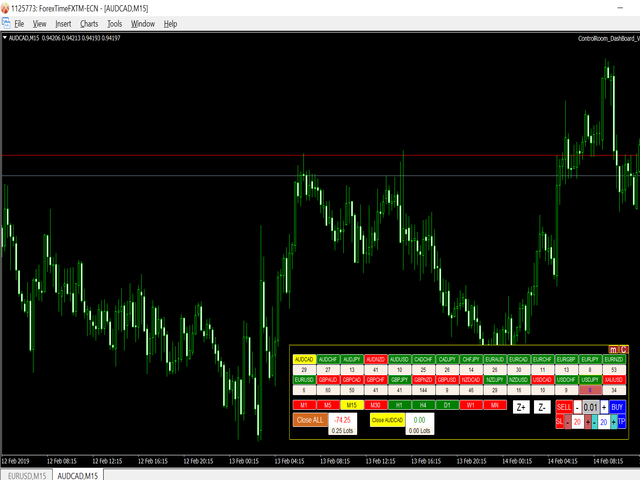
The ControlRoom DashBoard Utility is MUST to have professional tool for serious traders which gives immense power to their trading style and strategies. It has a powerful graphic user interface (GUI) screen which reduces the need to check different symbols in different timeframes separately and the need to have multiple screens for managing their live trades.
The DashBoard creates a Control Room setup where a trader can access the whole range of market (27 different symbols) at one point. With its unique Trend-Identification algorithm based on Heiken Ashi, the DashBoard highlights Green Coloration for Symbols which are in UpTrend in a particular timeframe and Red Coloration for DownTrend symbols thus adding confidence in trend identification. Also, it displays important critical information for trader like Total-Open-Lots, Total-Profit/Loss, Current-Symbol-Open-Lots, Current-Symbol-Profit/Loss, etc. The GUI has most-needed buttons like Close-All-Trades button to close all active trades with one click (of course it confirms first before doing that ;) ), Close-Current-Symbol-Trades button to close all open trades for that current symbol.
This DashBoard most importantly has an inbuilt scanner in its algorithm that scans the market continuously to spot opportunities like Breakouts and News Spikes which could provide much profitability trades. The alerts can be added for On-Screen, Email and Mobile alerts to react to such events instantly. In a way, the ControlRoom keeps an Eagle-Eye on the broader market events to ConTROL & Manage the trades in the best possible way.
important Features:
- Multi-Currency Scanning Support [28 pairs at one time]
- Adding BUY/SELL Positions with StopLoss & TakeProfit instantly from DashBoard (with /confirm/iations)
- Trend Identification & accordingly Green[up]/Red[down] Coloration in Multiple Timeframes
- only one Full Screen tab needed for fulling controlling all trades
- Fully Movable from one place to another on chart after double-clicking on it
- One Click CLOSE-ALL Button & CLOSE-SYMBOL Button for fast reaction to opportunities
- Displays Total Profit/Loss & Symbol Profit/Loss in DashBoard
- Displays Total Open LotSize & particular Symbol LotSize in DashBoard
- Zoom In & Zoom Out Buttons
- KeyBoard shortcut for very fast switching of Timeframes (with right arrow -> & left arrow <- keys)
- KeyBoard shortcut for very fast Zooming In & Out (with Up arrow / & Down arrow / keys)
- KeyBoard shortcut for fast Minimize & Maximize (with ESC & ENTER keys)
- An option to store all indicators or trendlines or any work done to each symbol separately. For that "Save Template of Every Chart" needs to be entered with 1 in Inputs Tab at start of the EA.
- DashBoard Panel displays color of Spread-Button under every open symbol as RED(for net negative) or GREEN(for net positive)
(Please Enter 0 in External Variable "Write 0 here" in Inputs Tab before starting the Expert Utility.)
Program settings of INPUT TAB, their detailed description and program behavior
- Default Lot Size - Default Lot Size can be entered to be used by the EA
- Control Panel Background Color - Background color of EA DashBoard Panel can be set
- Selected Button Color - Color of Selected Symbol & Timeframe
- Selected Text Color - Text Color of Selected Symbol & Timeframe
- General Button Color - Color of General Buttons
- General Button Border Color - Color of General Buttons Border
- Save Template of Every Chart - If 1 (YES) is entered, EA will save settings permanently (like trendlines, indicators, etc) as template for every symbol separately. & if 0 (NO) is entered, the settings will not be saved permanently.
- Default StopLoss Pips - Sets default value of Pips for Stoploss
- Default TakeProfit Pips - Sets default value of Pips for TakeProfit
- Enter Symbols -- Symbols can be entered manually also from Symbol1 to Symbol28
- Write 0 here - Zero (0) needs to be entered in this variable always.
For any suggestions/changes you want to add, please feel free to email me on miqbalgoni@gmail.com




本店最新上架
-
- MT4 MT5跟单EA 本地跟单远程跟单 绝不

- ¥1100.00
-
- 在MetaTrader市场购买MetaTrader 5的&#

- ¥3988.00
-
- 在MetaTrader市场购买MetaTrader 5的&#

- ¥3988.00
-
- 在MetaTrader市场购买MetaTrader 5的&#

- ¥3988.00
-
- 在MetaTrader市场购买MetaTrader 5的&#

- ¥3988.00
全网为您推荐
-
- AlgoTradeSoft

- ¥3988.00
-
- 国际期货套利软件

- ¥3988.00
-
- MT4 MT5跟单EA 本地跟单远程跟单 绝不
- ¥1100.00
-
- 在MetaTrader市场购买MetaTrader 5的&#
- ¥3988.00
-
- 在MetaTrader市场购买MetaTrader 5的&#
- ¥3988.00


