 客服热线:
 手机版
 二维码




































MoneyMaker v2
MoneyMaker v2
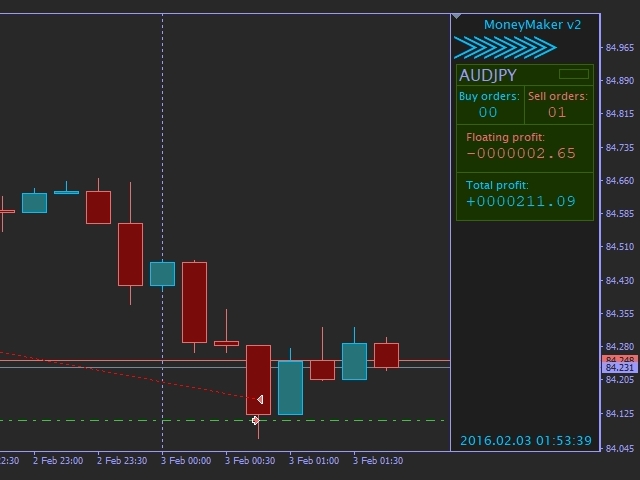
This expert advisor is based on idea that market produces very strong movement to opposite side once trend reversal is imminent. So our core trigger is bar size relative to previous bars optionally filtered by Bollinger Bands, Money Flow Index, Simple Moving Averages and Commodity Channel Index. MoneyMaker v2 also implements autolot based on free margin / Risk per single order (in %) parameter. Spread filtering is done through Minimum bar body size / pair spread multiplier (in points) parameter. Since we are considered with relativity between spread and bar body size we do not need to use only low spread pairs. Every order is opened with calculated stop-loss & take profit.
EA parameters
- [ MISC SETTINGS ]
- EA magic number
- Max allowed slipage points for orders
- [ NOTIFICATION SETTINGS ]
- Notify on fatal errors?
- Notify on basket close?
- [ STRATEGY SETTINGS - base TRIGGER ]
- EA main time period
- Current bars count to calculate sum of bar bodies
- Previous bars count to calculate sum of bar bodies
- Minimum bar body size / pair spread multiplier (in points)
- [ STRATEGY SETTINGS - FILTERS ]
- Enable Bollinger bands filter?
- Bollinger Bands period
- Bollinger Bands deviation
- Enable Money Flow Index filter?
- Money Flow Index period
- Maximum Money Flow Index value for buy order
- Minimum Money Flow Index value for sell order
- Enable Simple Moving Average filter?
- Short Simple Moving Average period
- Long Simple Moving Average period
- Enable Commodity Channel Index filter?
- Commodity Channel Index period
- Maximum Commodity Channel Index value for buy order
- Minimum Commodity Channel Index value for sell order
- [ STRATEGY SETTINGS - TP / SL ]
- Take profit to bar body size multiplier (in points)
- Stop-loss to bar body size multiplier (in points)
- [ STRATEGY SETTINGS - LOTS ]
- Enable risk based lots?
- Fixed lot size
- Risk per single order (in %)
How / what to optimize:
- Fire up myfxbook.com/forex-broker-spreads to figure out average difference between Dukascopy spread and your broker's spread per pair. Then properly configure Tick Data Suite v2 variable spread multiplier and base commission. If for example Dukascopy shows average spread 4 pips for EURUSD and your broker 2 pips, then set Spread multiplier to 0.5
- Disable all filters and use fixed (smallest that your broker allows) lot size in EA settings.
- Current bars count to calculate sum of bar bodies - This is what we use to calculate "current" combined body size (usually 1-3).
- Previous bars count to calculate sum of bar bodies - This is what we use to calculate "previous" combined body size (usually 3-10).
- Minimum bar body size / pair spread multiplier (in points) - once first two parameters are optimized to maximum balance, move onto this one. Normally this will show best profit when < 100.
- Afterwards optimize each filter by enabling them one by one.
- Move onto take profit and stop-loss. Usually it is best to let them to be 0.5 of bar size but you can try find better settings here.
- Finally enable autolot by controlling Risk percentage.
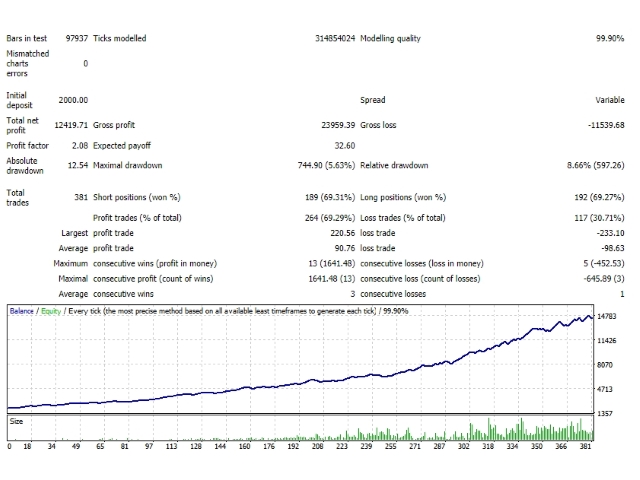
Default settings are provided as example using Dukascopy variable spread ticks data for EURUSD pair with spread multiplier set to 0.5 and base commission to 7$.
本店最新上架
-
- MT4 MT5跟单EA 本地跟单远程跟单 绝不

- ¥1100.00
-
- 在MetaTrader市场购买MetaTrader 5的&#

- ¥3988.00
-
- 在MetaTrader市场购买MetaTrader 5的&#

- ¥3988.00
-
- 在MetaTrader市场购买MetaTrader 5的&#

- ¥3988.00
-
- 在MetaTrader市场购买MetaTrader 5的&#

- ¥3988.00
全网为您推荐
-
- AlgoTradeSoft

- ¥3988.00
-
- 国际期货套利软件

- ¥3988.00
-
- MT4 MT5跟单EA 本地跟单远程跟单 绝不
- ¥1100.00
-
- 在MetaTrader市场购买MetaTrader 5的&#
- ¥3988.00
-
- 在MetaTrader市场购买MetaTrader 5的&#
- ¥3988.00


