 客服热线:
 手机版
 二维码






















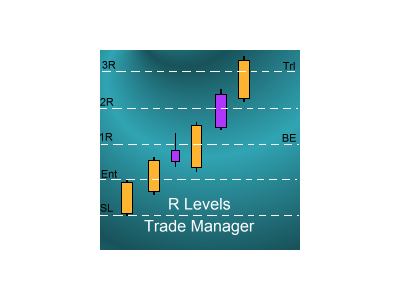














R Levels Trade Manager
Introduction
The SDS_TradeManager EA is a powerful EA designed to manage your positions once you have been filled. It basically works a break-even stop and also a trailing stop where the trigger levels and trail levels are all specified in "R's", that is to say multiples of the initial trade risk. Many successful professional traders think about all their trades and profit taking in terms of multiples of the initial risk R. So for example, if your initial risk on your trade is 50 pips and you want to move to break-even at "2R" then this price level trigger wold be 2 x 50 pips = 100 pips. Similarly for the same trade, you might want to start trailing at 5R and to trail by 2R which would mean that at 250 pips profit you would start trailing your stop loss by 100 pips.
How to use the EA
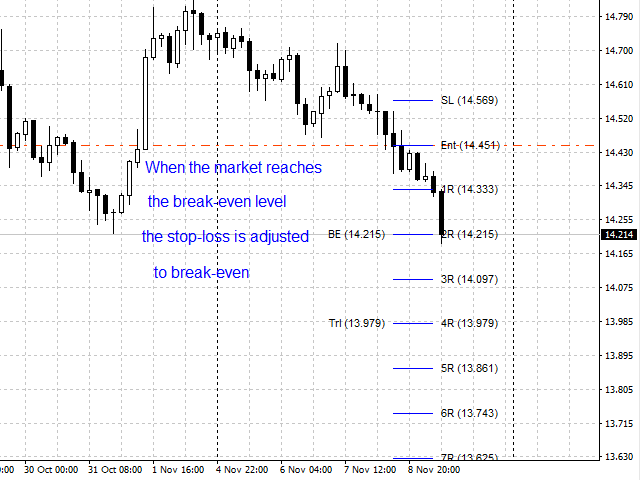
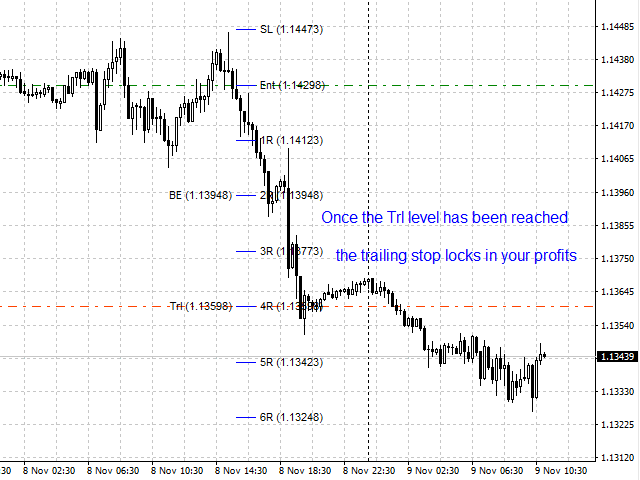
You basically add the EA to your chart at the start of your trading session where it will sit dormant until it finds an open position on your chart which has a stop-loss attached to it. Please note that without a stop-loss it's impossible for the EA to work out what the initial risk (or R) of the trade is so it can't manage the trade. As soon as it finds such a trade it plots all the R levels for trade (showing the various multiples of the initial risk that the trade might attain if it goes your way). It also marks where the break-even will trigger as well as where the trail will activate as well. You can configure many details of how all this works including the granularity of the adjustments of the trail (e.g. only adjust the trail every 0.5R etc.) and whether the trail is adjusted on an intrabar basis or only on the close of the bar. All the configuration details are explained below.
Input Parameters
BE_R: the R level at which the stop-loss is moved to break-even. Note if you don't want to use this functionality then simply make this a very large valueTrlStart_R: the R level at which the trailing stop activates. Note if you don't want to use this functionality then simply make this a very large value
TrlSize_R: this is the amount in R's by which the stop-loss trails behind the market. So a value of 1.5 will trail the stop-loss 1.5 times the initial risk behind the extreme of the move so far
TrlAdj_R: this is the "granularity" of the adjustments to the trailing stop. So with a value of 0.5R here then the stop-loss will only be adjusted every 0.5R and in between this amount no adjustment will be made. If this is set to 0.0 then the stop will be adjusted immediately for every new extreme in the market move.
StopType: this is either "Intrabar" or "OnClose". If the former is selected then every tick the stop is checked to see if it needs adjusting. If the latter is selected then adjustments are only made on the close of each bar
ShowEntryAndStop: if set to true then the EA will draw in the entry and initial stop-loss levels as part of the drawing of the R levels.
ShowRLevels: if set to true then the R levels for the trade will be plotted.
RInterval: this specifies the increment in the R levels for when they are drawn
RLast: this specified the last R value for when they are drawn
NumBarsWidth: this specifies the length of the R-levels plots (in bars) that the lines are drawn
DeleteLinesOnTradeClose: if set to true then the plot lines are removed once the trade is closed. If set to false then they will remain on the chart after the end of the trade
DeleteLinesOnEARemoval: if set to true then the plot lines are removed once the EA is removed from the chart. If set to false then they will remain on the chart after the EA is removed.
LineThickness: this specifies the thickness of the R level plot lines
Line_Colour: this specifies the colour of the R level plot lines
LineStyle: this specifes the style (e.g. solid, dotted etc.) of the R level plot lines
Font_size: this specifies the size of the font that is used to label the R level plot lines
Font_type: this specifies the font that is used to label the R level plot lines
Font_Colour: this specifies the colour of the font that is used to label the R level plot lines
LevelLabelOffset: this specifies where the label is drawn in relation to the R level plot lines

本店最新上架
-
- MT4 MT5跟单EA 本地跟单远程跟单 绝不

- ¥1100.00
-
- 在MetaTrader市场购买MetaTrader 5的&#

- ¥3988.00
-
- 在MetaTrader市场购买MetaTrader 5的&#

- ¥3988.00
-
- 在MetaTrader市场购买MetaTrader 5的&#

- ¥3988.00
-
- 在MetaTrader市场购买MetaTrader 5的&#

- ¥3988.00
全网为您推荐
-
- AlgoTradeSoft

- ¥3988.00
-
- 国际期货套利软件

- ¥3988.00
-
- MT4 MT5跟单EA 本地跟单远程跟单 绝不
- ¥1100.00
-
- 在MetaTrader市场购买MetaTrader 5的&#
- ¥3988.00
-
- 在MetaTrader市场购买MetaTrader 5的&#
- ¥3988.00


