 客服热线:
 手机版
 二维码





































Mind the Gaps
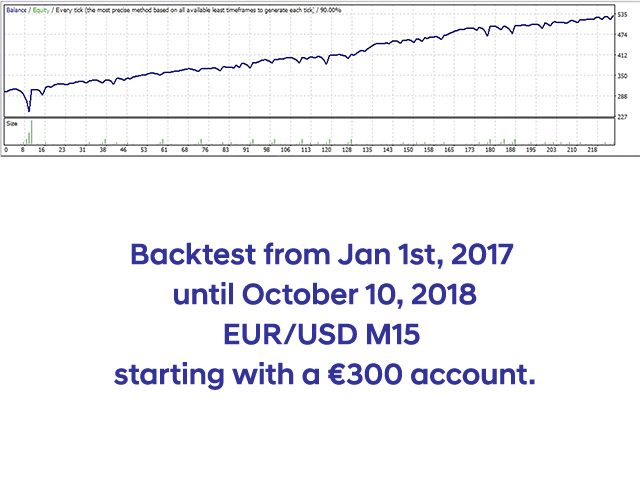
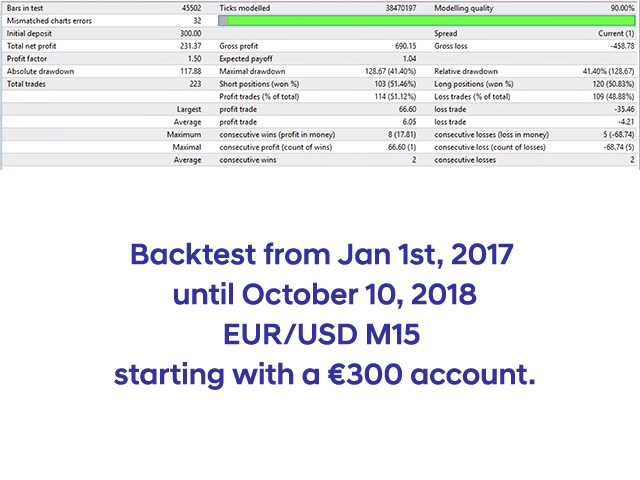
This Expert Advisor is using three Moving Averages to find the direction of the trend. There is three different Moving Averages that has to be in the right order and the EA is looking for this in different timeframes to make sure it's in the order to trade. Then the EA will look for both the Stochastic and RSI in different timeframes before everything is looking good. Now it will take a BUY or SELL trade, depending on the indicators. It will set the Stop Loss and Take Profit depending on the highest and lowest price when looking back at previous candles. Then it will calculate the Average Range and then try to reach a decent profit within those numbers. If it can't make it to the profit level it will wait for a new indication and then add more lots to the previous trade (if you set this parameter to multiply) and then try to reach the same distance to make a total profit. When a trade reach the profit goal it will calculate a new range and set a new Take Profit and Stop Loss for the next trade.
The EA can be used on different pairs and is hardcoded to use the M15 timeframe. If you like to trade the JPY pairs you need to change the 10000 number to 100 so the calculations t find the right level between the high and low are correct. But the default settings will work for pairs not involved with JPY. The best thing about this Expert Advisor is that this one is checking the movement of the traded pair and change it's goals along the way. So the Take Profit and Stop Loss will change depending on the market before it places the first trade.
EAName - This is the name shown in the comments column (default: Mind The Gaps)
FirstLotSize - First lot size to trade after a trade in profit (default: 0.01)
LotsMultiplier - What to add to the next trade if one reach stop loss (default: 2.0)
CandlesBack - How many candles back to check for the highest and lowest price for the calculation of the Average Range. It will then calculate another Average Ranger the same distance further back to make sure the range is common for the actual pair (default: 95)
TheDivider - This one is used to calculate the high - low and then divide the number to set the stop loss and take profit levels. Default is set to 2.0 and that will make the levels reach 50% of the total distance. If you set it to 1.5 it will try to reach 66% of the total gap (which is a little harder) (default:2.0)
MA1 - Moving Average 1 period (default: 250)
MA2 - Moving Average 2 period (default: 110)
MA3 - Moving Average 3 period (default: 50)
RSI_hi - The high level of the RSI indicator (default: 60)
RSI_lo - The low level of the RSI indicator (default: 40)
StoHi - The high level of the Stochastic indicator (default: 80)
StoLo - The low level of the Stochastic indicator (default: 20)
InfoHeadlineCol - The color of the headline shown when a trade is taken (default: Gold)
InfoTextCol - The color of the text shown when a trade is taken (default: White, which need a black background)
InfoHeadlineSize - The font size of the headline shown when a trade is taken (default: 10)
InfoTextSize - The font size of the text shown when a trade is taken (default: 8)
StopLossPercent - This is the % where the stop loss is set compared to the take profit (default: 90)
LowestDistance - The lowest distance to trade after calculating the range. To make sure it isn't trading in a smaller ranging market. (default: 2)
StartTimeGMT - If you want the EA to only trade between a specific time, this is where you set the Start Time in GMT (default: 00:00)
EndTimeGMT - If you want the EA to only trade between a specific time, this is where you set the End Time in GMT. The default settings are set to trade around the clock. (default: 23:59)
MagicNumber - This must be a unique number if you are using the EA more than once on the same currency pair
本店最新上架
-
- MT4 MT5跟单EA 本地跟单远程跟单 绝不

- ¥1100.00
-
- 在MetaTrader市场购买MetaTrader 5的&#

- ¥3988.00
-
- 在MetaTrader市场购买MetaTrader 5的&#

- ¥3988.00
-
- 在MetaTrader市场购买MetaTrader 5的&#

- ¥3988.00
-
- 在MetaTrader市场购买MetaTrader 5的&#

- ¥3988.00
全网为您推荐
-
- AlgoTradeSoft

- ¥3988.00
-
- 国际期货套利软件

- ¥3988.00
-
- MT4 MT5跟单EA 本地跟单远程跟单 绝不
- ¥1100.00
-
- 在MetaTrader市场购买MetaTrader 5的&#
- ¥3988.00
-
- 在MetaTrader市场购买MetaTrader 5的&#
- ¥3988.00


