 客服热线:
 手机版
 二维码





































Multicurrency overview
Stay updated with Multicurrency Overview!!
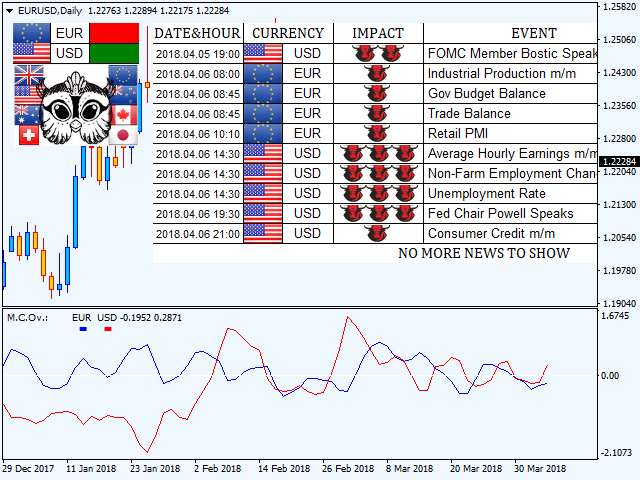
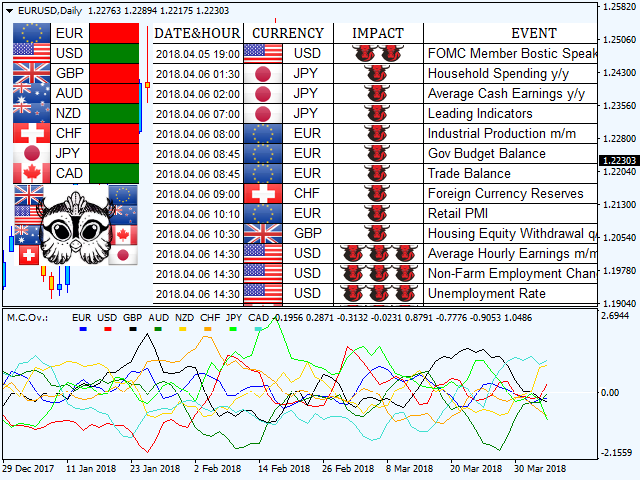
The algorithm of this EA releases an average of the movement percentage of all the Forex currencies linked to a single currency, isolating it, letting us to comprehend its real and specific trend.
Above on the left, a panel show us efficiently the trend of the currency, in the timeframe actually used. The second panel will keep you updated on macroeconomic news.
P.N.:The news time is based on your pc clock time, this way you won't have any problem regarding brokers time :
User manual:
Installing:
Multicurrency Overview is an EA, so you have to insert it in "MQL4/Experts" folder.
To stay updated on macro news, you got to allow WebRequest to https://minerva.management on Tools/Options/Expert Advisors (from your MT4 terminal).
You will have a button called "economic calendar". If pushed, the EA will show you macro news.
Input values:
PANEL SETTINGS:
Minimal impact: Here you can choose the minimal impact of the macro news you want to see, if you want to see just "three bulls" news (strong impact), you can set the value on "strong".
Background color: Here you can choose the panel background color.
Front color: You can choose the panel front color.
Buy color: You can choose the color of BUY signal.
Sell color: You can choose the color of SELL signal.
EA SETTINGS:
Enable alert: If set on"True", you'll receive an alert regarding the currencies directionality.
Send mail: If set on"True", you'll receive an e-mail on your phone or any other device, to have always at your disposal the currencies directionality.
Bars to calculate: Choose how may bars/candles trend the indicator will show on the lower window.
Average: Average you'd like to apply on the currencies trend.
Average method: Kind of average you'd like to apply on the currencies trend. (Simple, linear weighted, exponential, smoothed)
Show eur,usd ecc..: If set on"True",the indicator will do calculations on currency, if "False" will ignore it.
Eur,usd ecc.. color: Choose the color to see the movement of the currency on the lower window.
Last but not least, you'll find a list of the currencies on which the indicator will do its calculations.
In case you are using a broker with peculiar suffixes (ex:EURUSDp o EURUSD_), it will suffice to change currencies names and saving the template.
本店最新上架
-
- MT4 MT5跟单EA 本地跟单远程跟单 绝不

- ¥1100.00
-
- 在MetaTrader市场购买MetaTrader 5的&#

- ¥3988.00
-
- 在MetaTrader市场购买MetaTrader 5的&#

- ¥3988.00
-
- 在MetaTrader市场购买MetaTrader 5的&#

- ¥3988.00
-
- 在MetaTrader市场购买MetaTrader 5的&#

- ¥3988.00
全网为您推荐
-
- AlgoTradeSoft

- ¥3988.00
-
- 国际期货套利软件

- ¥3988.00
-
- MT4 MT5跟单EA 本地跟单远程跟单 绝不
- ¥1100.00
-
- 在MetaTrader市场购买MetaTrader 5的&#
- ¥3988.00
-
- 在MetaTrader市场购买MetaTrader 5的&#
- ¥3988.00


