 客服热线:
 手机版
 二维码






































BBands Envelope
"BBands Envelope" is a fully automated Expert Advisor, based on Bollinger Bands, 2 types of Envelopes and DeMarker and several other indicators to identify buy trends or sell trends. After that, moving average can find reversal zones. It includes recovery loss and grid system to increase efficiency.
There are two types of strategies
- Moving Average
- Stochastic
Real Monitoring: https://www.mql5.com/en/users/aminx/seller
Expert Advisor Advantages
- Clean and adjustable strategy for various results and traders can change parameters for find best results (long-term or scalping)
- Working on any broker
- No need to close the EA during news releases.
- No need to change pairs on the grounds of "instability".
- Does not require a very good execution.
Note
Default parameters not optimized for any pairs but you can get latest set files on comments tab.
Parameter list
- TradingMode - you can choose one or both
- ShowInfo - true/false EA panel
- Corner - you can change EA panel zone
- TextColor - color of EA panel
BBand Settings
- BBand Timeframe - you can change it on current timeframe
- BBand_Period;
- BBand_Shift;
- BBand_AppliedPrice;
Demarker Settings
- Demarker_Timeframe - you can change it on current timeframe
- Demarker_Period;
- Highest_Level;
- Lowest_Level;
Envelopes Settings
- Envelope_Timeframe - you can change it on current timeframe
- Envelope_Period;
- Envelope_MA_Method;
- Envelope_MA_Shift;
- Envelope_AppliedPrice;
- Envelope_Deviation;
Strategy 1(MovingAverage)
- Use_Str1=Use Strategy 1; true/false
- MA_Timeframe - you can change it on current timeframe
- MA_Period;
- MA_Shift;
- MA_Method;
- MA_AppliedPrice;
Strategy 1 TakeProfit - StopLoss
- TP_SL1_Mode=Envelope; TP/SL Mode, If use Envelope, second Envelope up line and down line is tp and sl
- str1_TakeProfit=Fixed TakeProfit
- str1_StopLoss=Fixed StopLoss
Second Envelope auto sl and tp (second Envelope up line is tp for buy orders and down line is sl and reverse for sell orders)
- Envelope_Timeframe;
- TP_SL1_Envelope_Period;
- MA_METHOD TP_SL1_Envelope_MA_Method=;
- Envelope MA Shift;
- TP/SL Envelope Applied Price;
- Envelope_Deviation;
Strategy 1 - TrailingStop & BreakEven
- TrailingStop - true/false
- Trailing_Stop;
- Break_Even_pip;
- Trailing_Step;
Automatic Lots (If The MoneyManagement Set To False Trade In Fixed Lots)
- Fixed_Lots;
- MoneyManagement - true/false
- Riskpercent - Risk %
- Magic_Number;
- Trade_Comment - Comment for strategy 1
Strategy 1 RecoveryLoss
- Recoveryloss - true/false (if it's true, ٍَafter loss trades EA will be open new trade unlike loss trade)
Strategy 1 RecoveryLoss Grid
- Recoverylossgrid - Using Recovery Loss Grid (if it's true, EA will be open grid trades after recovery loss order)
Strategy 2(Stochastic)
- Use_Str2 - true/false//Use Strategy 2-true/false
Stochastic Settings
- Stoch_crossing - Stochastic crossing after moving average reversal zone
- toch_Timeframe - Stochastic Timeframe - you can get higher timeframe of Stochastic on current timeframe
- Stoch_KPeriod - Stochastic K% Period
- Stoch_DPeriod - Stochastic D% Period
- Stoch_Slowing - Stochastic Slowing
- Stoch_MA_Method - Stochastic MA Method
- Stoch_Price - Stochastic Price
- Stoch_HighestLevel - Stochastic Highest Level
- Stoch_LowestLevel - Stochastic Lowest Level
Strategy 2 TakeProfit - StopLoss
- TP_SL2_Mode - TP/SL Mode, If use Envelope, second Envelope up line and down line is tp and sl
- TakeProfit - Fixed TakeProfit
- StopLoss - Fixed StopLoss
Second Envelope auto sl and tp (second Envelope up line is tp for buy orders and down line is sl and reverse for sell orders)
- Envelope_Timeframe
- Envelope_Period
- Envelope_MA_Method
- Envelope_MA_Shift
- Envelope_AppliedPrice
- Envelope_Deviation
Strategy 2 TrailingStop &BreakEven
- Use_TrailingStop=true/false
- Trailing_Stop;
- Break_Even_pip;
- Trailing_Step;
Strategy 2 Automatic Lots (If The MoneyManagement Set To False Trade In Fixed Lots)
- Fixed_Lots;
- MoneyManagement - true/false
- Riskpercent - Risk %
- Magic_Number;
- Trade_Comment - Comment for strategy 2
Strategy 2 RecoveryLoss
- Recoveryloss - true/false (if it's true, after loss trades EA will be open new trade unlike loss trade)
Strategy 2 RecoveryLoss Grid
- Recoverylossgrid - Using Recovery Loss Grid (if it's true, EA will be open grid trades after recovery loss order)


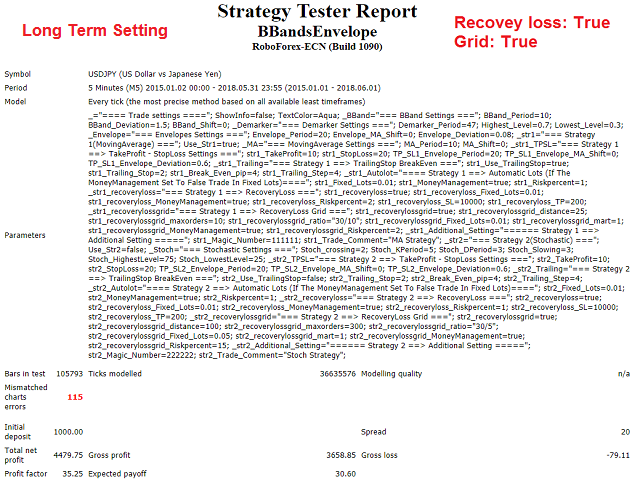
 nload="if(window.viewGallery_GalleryManager) viewGallery_GalleryManager.ImageonLoad(this,7);" />
 nload="if(window.viewGallery_GalleryManager) viewGallery_GalleryManager.ImageonLoad(this,8);" />
 nload="if(window.viewGallery_GalleryManager) viewGallery_GalleryManager.ImageonLoad(this,9);" />
 nload="if(window.viewGallery_GalleryManager) viewGallery_GalleryManager.ImageonLoad(this,10);" />
 nload="if(window.viewGallery_GalleryManager) viewGallery_GalleryManager.ImageonLoad(this,11);" />
本店最新上架
-
- MT4 MT5跟单EA 本地跟单远程跟单 绝不

- ¥1100.00
-
- 在MetaTrader市场购买MetaTrader 5的&#

- ¥3988.00
-
- 在MetaTrader市场购买MetaTrader 5的&#

- ¥3988.00
-
- 在MetaTrader市场购买MetaTrader 5的&#

- ¥3988.00
-
- 在MetaTrader市场购买MetaTrader 5的&#

- ¥3988.00
全网为您推荐
-
- AlgoTradeSoft

- ¥3988.00
-
- 国际期货套利软件

- ¥3988.00
-
- MT4 MT5跟单EA 本地跟单远程跟单 绝不
- ¥1100.00
-
- 在MetaTrader市场购买MetaTrader 5的&#
- ¥3988.00
-
- 在MetaTrader市场购买MetaTrader 5的&#
- ¥3988.00


