 客服热线:
 手机版
 二维码





































CheckOnlineStatusMq4
Check Online-Status monitors your terminal.
If its connection to the server is interrupted for longer time, you will receive an email and/or a push notification, depending on what your settings. You can find out how long the terminal has been offline and can judge the quality of your brokers and/or the provider of your VPS after some time. Remember, the terminal manages and controls your money. Everything hangs in the air if it has no connection to the server!
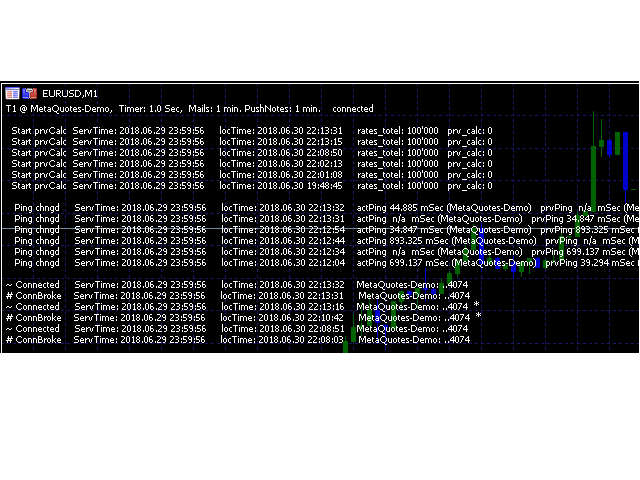
Check Online-Status displays the three important elements about the online status of the terminal:
- prev_calculated: sometimes the terminal sets prev_calculated to zero, forcing an indicator to recalculate the historical bars of the chart.
- ping: Sometimes the terminal switches to another server of the broker.
- connected: Displays the connection status. A '~' symbolizes an working connection, # a disconnection, that means the server is not responding by what ever reason. An '*' at the end of the line indicates that an e-mail has been sent.
The last entry about the status is shown in the first line of their respective section. Displayed are the server time and the local time of the pc (vps).
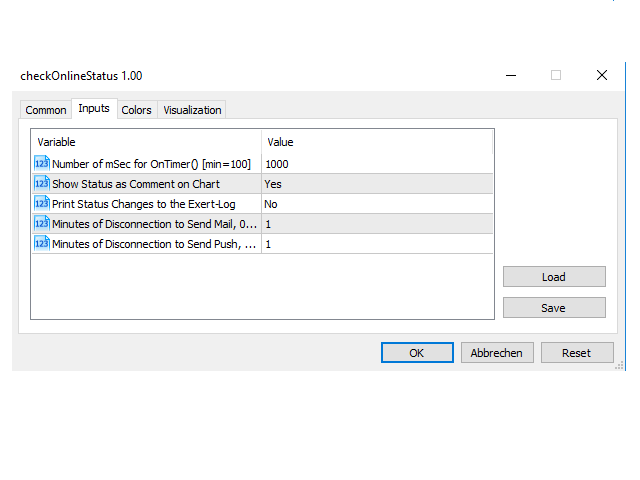
You can define the following input variables for the indicator:
- Number of mSec for onTimer()[min=100] - To specify the time interval in milliseconds (mSec) after which Check Online-Status the online status is checked again. The minimum is 100 mSec, smaller values would unnecessarily overload the system. But remember that Check online status is activated by onCalculate() (every new tick) and onTimer().
- Show Status as Comment on Chart (Yes/No) - Display of information as comment on the main chart.
- Print Status Changes to the Exert-Log (Yes/No) - Print the messages to the expert log.
- Minutes of Disconnection to Send Mail, 0=no Mails - E-mails are sent if the terminal is not connected to the server for longer than the entered number of minutes. 0 means that no e-mails will be sent.
- Minutes of Disconnection to Send Push, 0=no Push - Push notifications are sent if the terminal is not connected to the server for longer than the entered number of minutes. 0 means that no push notifications will be sent.
If the indicator displays the status on the chart as a comment, you see:
- In the top line you see the name of the directory of your terminal (the first 6 characters), the server of your broker, the settings and whether a connection currently exists or not.
- Below that the three sections: 1) the loaded bars of the actual chart, 2) the recent ping and 3) the connection.
If available, the last 6 events are displayed, each in one line. In the image of the chart you can see for example that the terminal lost the connection to the server (the demo server of metaQuotes) on Saturday 30 June 2018 at 22:10:42 and was able to restore it about 3 minutes later. Both times emails and/or push notifications were sent because the interruption lasted longer than the set 1 minute.
The Emails and the Push-Notification
In the subject of the email you see:
MAIL-T1 metaQuotes-Demo, 2018.06.30 22:13 connected
T1 is the directory (respectively its first 6 characters) of the terminal, then follows the name of the server and the time at which the email was sent.
In the body of the email you see the last 6 lines about the connections the same way you seem them on the chart:
~ Connected     ServTime: 2018.06.29 23:59:56     locTime: 2018.06.30 22:13:16    metaQuotes-Demo: ..4074  *
# ConnBroke    ServTime: 2018.06.29 23:59:56     locTime: 2018.06.30 22:10:42     metaQuotes-Demo: ..4074  *
~ Connected     ServTime: 2018.06.29 23:59:56     locTime: 2018.06.30 22:08:51    metaQuotes-Demo: ..4074
# ConnBroke    ServTime: 2018.06.29 23:59:56     locTime: 2018.06.30 22:08:03     metaQuotes-Demo: ..4074
~ Connected     ServTime: 2018.06.29 23:59:56     locTime: 2018.06.30 22:01:50    metaQuotes-Demo: ..4074
# ConnBroke    ServTime: 2018.06.29 23:59:56     locTime: 2018.06.30 22:01:45     metaQuotes-Demo: ..4074
Push notifications have a subject line, but, due to the limitation to 255 characters, only the latest status message!
After a push notification has been sent, the next one can only be sent 1 minute later. This is to prevent too many push notification being sent.
I hope it helps you!
PS.: Please note further information at the beginning of the discussion!
本店最新上架
-
- MT4 MT5跟单EA 本地跟单远程跟单 绝不

- ¥1100.00
-
- 在MetaTrader市场购买MetaTrader 5的&#

- ¥3988.00
-
- 在MetaTrader市场购买MetaTrader 5的&#

- ¥3988.00
-
- 在MetaTrader市场购买MetaTrader 5的&#

- ¥3988.00
-
- 在MetaTrader市场购买MetaTrader 5的&#

- ¥3988.00
全网为您推荐
-
- AlgoTradeSoft

- ¥3988.00
-
- 国际期货套利软件

- ¥3988.00
-
- MT4 MT5跟单EA 本地跟单远程跟单 绝不
- ¥1100.00
-
- 在MetaTrader市场购买MetaTrader 5的&#
- ¥3988.00
-
- 在MetaTrader市场购买MetaTrader 5的&#
- ¥3988.00


