 客服热线:
 手机版
 二维码





































Range Bar Chart
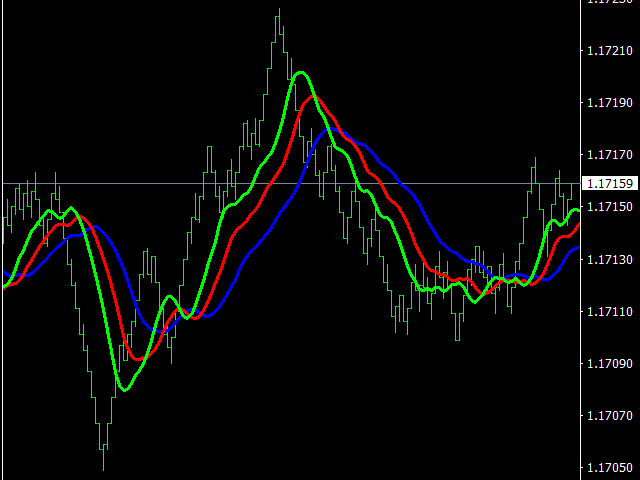
Range bar charts with equal size bars that can possibly have shadows can be created using this indicator. Data on the range bar chart are distributed by the bar size, rather than by the time. Each bar represents the price movement instead of time period. It works simple – the bar is not drawn as long as the price does not move. The size of the bar can be set in the settings by changing the Size parameter value. You can add indicators, EAs and scripts to the resulting chart. You get the completely operational chart which can be processed just like a regular one.
The Range Bar Chart indicator is not only history based, but also built online. At the same time, the data is updated synchronously with the basic chart with no delays.
You can simultaneously create several charts each with the required bar size.
Inputs
- Size - size of range bars (in points).
- Chart - timeframe for a chart opened in a separate window. In case you are going to work with a single chart for the currency pair, the timeframe is irrelevant. Timeframe does not affect the calculations during the range bar chart creation. This setup is created to open several charts for the same currency pair, but with different Size parameter settings. In such case, different timeframes for each chart (for example, M2, M3, M4) should be set. Different timeframes should also be set when Renko Chart and Range Bar Chart are started simultaneously for the same currency pair.
Launch
- Open the Navigator window.
- Drag the indicator of the desired currency pair (M1 timeframe or larger, depending on the Size parameter value) onto the chart.
- Open the resulting chart by clicking the corresponding Open Chart button.


本店最新上架
-
- MT4 MT5跟单EA 本地跟单远程跟单 绝不

- ¥1100.00
-
- 在MetaTrader市场购买MetaTrader 5的&#

- ¥3988.00
-
- 在MetaTrader市场购买MetaTrader 5的&#

- ¥3988.00
-
- 在MetaTrader市场购买MetaTrader 5的&#

- ¥3988.00
-
- 在MetaTrader市场购买MetaTrader 5的&#

- ¥3988.00
全网为您推荐
-
- AlgoTradeSoft

- ¥3988.00
-
- 国际期货套利软件

- ¥3988.00
-
- MT4 MT5跟单EA 本地跟单远程跟单 绝不
- ¥1100.00
-
- 在MetaTrader市场购买MetaTrader 5的&#
- ¥3988.00
-
- 在MetaTrader市场购买MetaTrader 5的&#
- ¥3988.00


