 客服热线:
 手机版
 二维码





































Panel InfoSpread
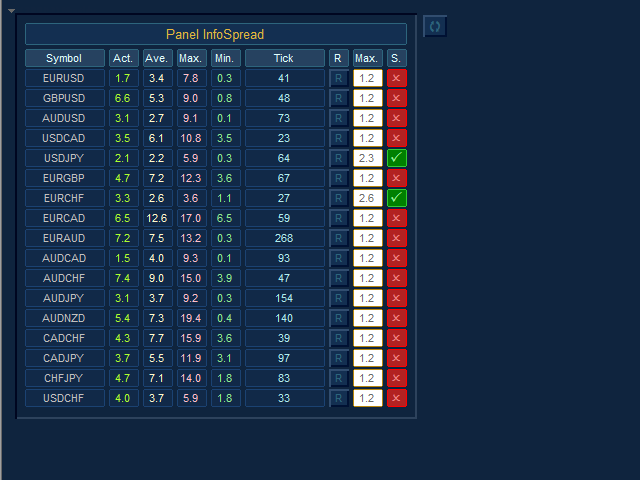
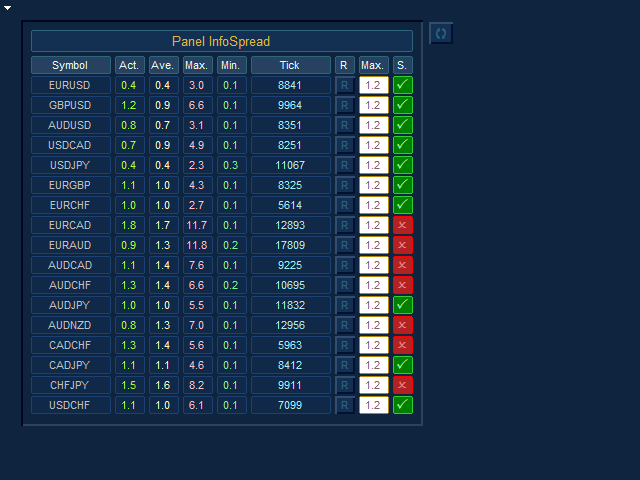
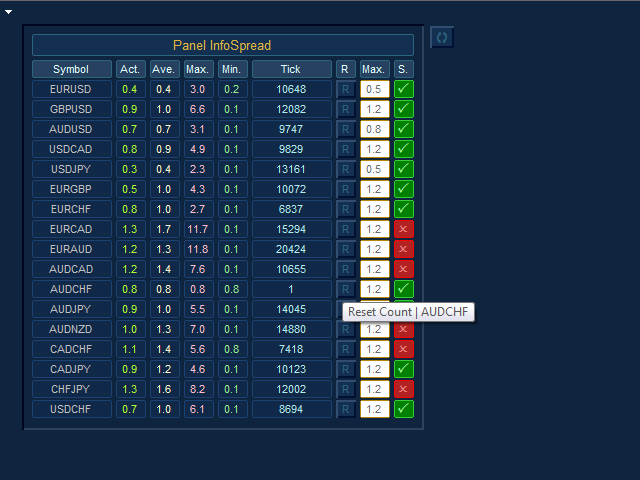
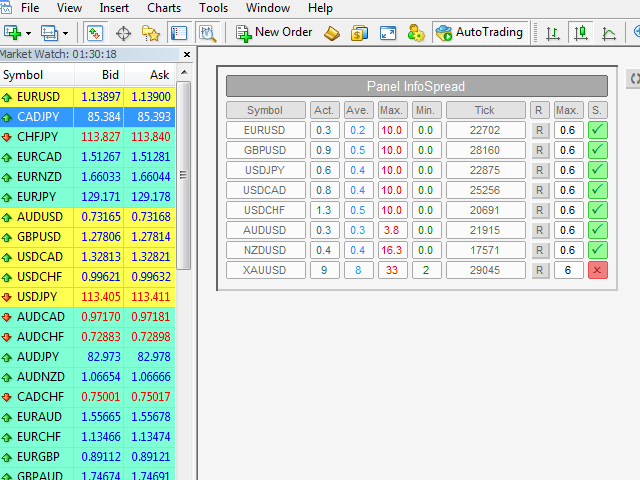
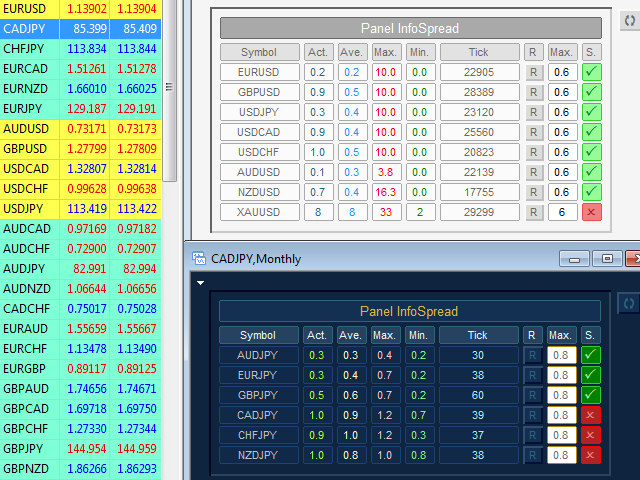
- We all want to have the lowest spread and never high, with this utility we can have more information and a clearer idea of when the spread is acceptable or not. The Panel InfoSpread is a utility expert advisor and shows information on different spread options in one or more symbols, can be actual spread, average, minimum, maximum and tick counter. Read and show the symbols that are in the Market Watch window. Also you can put a maximum limit of average spread in every symbol for know when you have a good spread or not. Each symbol has its own tick counter and its button to restart it
Input Parameters:
- Coordinates X Upper Left Corner: Put value of the default fixed coordinates X since the upper left corner to show the panel.
- Coordinates Y Upper Left Corner: Put value of the default fixed coordinates Y since the upper left corner to show the panel.
- Refresh Spreads: Refreshes the spreads information every X set point in seconds (minimum 0.025 sec).
- Actual Spread Column: Enabled or Disabled Actual Spread Column.
- Average Spread Column: Enabled or Disabled Average Spread Column.
- Maximum Spread Column: Enabled or Disabled Maximum Spread Column.
- Minimum Spread Column: Enabled or Disabled Minimum Spread Column.
- Tick Counter Column: Enabled or Disabled Tick counter column. Count each tick when change value of spread and refresh spread.
- Maximum Average Spread Column: Enabled / Disabled set point value of the maximum limit of the average spread Column.
- State Maximum Average Spread Column: Enabled / Disabled State of the maximum limit of the average spread Column.
- Global Button to Reset All: Enabled or Disabled Button to restart the entire panel.
- Global Maximum Average Spread: Maximum allowed global value of the average spread in pips and pipettes.
- Pairs List: Select type pairs list, from Market Watch or Entry Manual.
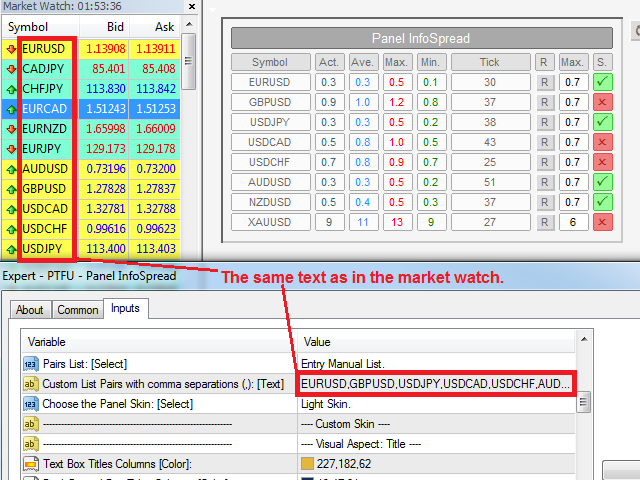
- Custom Pairs List with comma separations (,): Write the pairs you want separated by a comma and with the text exactly the same as in the Market Watch window to create the list (If the parameter Pairs List is selected Entry Manual List).
- Choose the Panel Skin: Select colors style of the panel.
- Panel Colors: The colors of the visual aspect of the panel.
Recommendations:
- only use symbols of currency pairs.
- You must open a new chart with any symbol to use the Panel Infospread.
- The currency symbols that you want to use in the Panel InfoSpread should be those that are selected in the Market Watch (If the parameter Pairs List is selected Market Watch List).
- Do not change the time frame, because the default time frame will be monthly for a better update on the chart.
- The recommended seconds to refresh the spread values are 0.3 or less in the Refresh Spreads input (Minimum 0.025 seconds) How much lower the value better precision, but it will depend on your broker, internet, connection, and especially of your computer.
- If we manually enter the list of pairs we want, these should also be in the Market Watch (If the parameter Pairs List is selected Entry Manual List).
- If we want to modify the parameters of the inputs quickly, we must select the chart with the Panel InfoSpread, and press the “F7” key.
本店最新上架
-
- MT4 MT5跟单EA 本地跟单远程跟单 绝不

- ¥1100.00
-
- 在MetaTrader市场购买MetaTrader 5的&#

- ¥3988.00
-
- 在MetaTrader市场购买MetaTrader 5的&#

- ¥3988.00
-
- 在MetaTrader市场购买MetaTrader 5的&#

- ¥3988.00
-
- 在MetaTrader市场购买MetaTrader 5的&#

- ¥3988.00
全网为您推荐
-
- AlgoTradeSoft

- ¥3988.00
-
- 国际期货套利软件

- ¥3988.00
-
- MT4 MT5跟单EA 本地跟单远程跟单 绝不
- ¥1100.00
-
- 在MetaTrader市场购买MetaTrader 5的&#
- ¥3988.00
-
- 在MetaTrader市场购买MetaTrader 5的&#
- ¥3988.00


