 客服热线:
 手机版
 二维码






















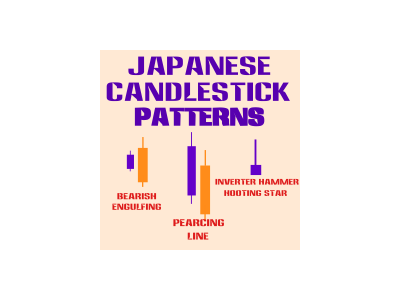














Japanese CandleStick Pattern
This is a Japanese Patterns EA. It can identify about 21 Variants of CandleStick Patterns. It also labels the pattern on Chart.
The EA incorporates Trade Management by using flexible Stop Loss, Trailing Stop Loss and Take Profit.
The Customer can also Toggle ON/OFF any of the Patterns as they wish for full flexibility.
There is also a possibility to TOGGLE ON/OFF a Martingale Function Inbuilt
All timeframes and Currencies are supported, but please note that it is recommended that you perform Optimization for best parameter settings.
The Candlestick Patterns Included are
- Tweezers,
- Crows,
- Bull and Bear Harami,
- Harami Cross,
- Morning and Evening Stars
- Rising and falling Windows
- High Wave Candles
- Bear and Bull Engulfing,
- Piercing, close cousins,
- Bear dark cloud cover,
- Bull/Bear Hanging Man,
- Kicker signal,
- Rising (bull) falling (bear) three methods,
- Three black crows,
- Three white soldiers.
- Pipe Tops & Bottoms,
- Spike Lows & Highs,
- Triple Top and Triple Bottom,
- Island reversal
- Hikkake pattern,
- Soldiers
Input parameters
- EA_Name: This Name of EA will be Printed in the Comments of Each Trade
- Choose EA Mode: Choose whether the EA should Open Real Trades (Trading Mode) or Just send alerts (alert Mode)
- BB_RSI_MACD_Combination: Choose Bollinger Band and RSI Combination for Entry between
1. Option 1: Use Any one of Bollinger Band or RSI
2. Option 2: Use Both Bollinger Band & RSI
3. Option 2: Don't Use Any Indicator to Confirm Entry
- TradeTweezerPattern: Toggle to Use Tweezer Pattern true/False
- MaxPipsBtwTweezerLows: Set Maximum Pips Between Tweezers Candles High/Low
- TradeCrowsSoldierPattern: Toggle to Use Crows & Soldier Pattern true/False
- CrowPipsBtwCLoseAndLow: Set Maximum Pips Between Crows/Soldiers Close To Previous High/Low
- TradeBullBearHarami: Toggle to Use bull & bear harami Pattern true/False
- TradeHaramiCross: Toggle to Use Harami Cross Pattern true/False
- TradeStar: Toggle to Use Morning and Evening Star Pattern true/False
- PipsGapBtwStarAndPreviousCandle: Set Minimum Pips Between Star and Previous Candle Close
- TradeWindows: Toggle to Use Rising and Falling Windows Pattern true/False
- MinPipsBtwWindowsCandles: Set Min Pips Between Candles
- TradeEngulfing: Toggle to Use Bullish & Bearish Pattern true/False
- TradePiercingDCC: Toggle to Use Piercing and Dark Cloud Cover Pattern true/False
- TradeCounterAttack: Toggle to Use Counter Attack Pattern true/False
- TradeHammarHangingMan: Toggle to Use Hammer and Hanging Man Pattern true/False
- HammerHangingManTrendBarsBack: Set Hammer & Hanging Man Number of Bars to look Back
- HammerHangingManMaxBodySizePips: Set Hammer & Hanging Man Max Body Size inPips
- TradeKickerSignal: Toggle to Use Kicker Signal Pattern true/False
- TradeRisingFalling3Methods: Toggle to Use Rissing and Falling three Pattern true/False
- RisingFalling3MethodsTrendBarsBack: Set Rising & Falling three Methods Number of Bars to look Back
- TradePipeTopBottom: Toggle to Use Pipe Top & Bottom Pattern true/False
- TradeHikkake: Toggle to Use Hikkake Pattern true/False
- MaxBarsBtwIndicatorsAndPattern: Maximum Bars Between Indicators Confirmation Point and Pattern
- MyRecoupCondition: Choose How to Use Lot Multiplier to Recoup Losses
- AutoCalcMultiplier: if true, EA will Automatically Calculate Multiplier for Recouping Losses
- UseFixedMultiplier: Specifies the Multiples of Fixed Lot To Add (If AutoCalcMultiplier=False)
- Magic Number: Trade Magic Number, if value=0, the EA Automatically Calculates Magic Number
- UseHiddenTPnSL: Hide the Set Stop Loss and Take Profit from displaying on the Chart
- FixedLots: Minimum Trading Lots Size when Auto recoup Lot Multiplier is not used
- StopLoss: Use Fixed Stop Loss Pips
- TrailSL_Pips: Pips of Stop to trail after BreakEven
- UseBreakEven: Toggle to either Use BreakEven or Not
- BreakEvenAdd: Pips to add Above/below Open Price at Break Even
- RiskReward: Use Risk reward of this figure to set Take Profit
- TakeProfit:Use Fixed Profit in Pips
- ChooseExitModeAtFixedTP: Choose Exit Mode When Fixed Take Profit is Hit:
- PercentOfLot4PartialClose: Percentage of Lot to Close at Take Profit
- Slippage: Allowed Trade Slippage Pips
- MaxSpread: Maximum allowed Spread
- ShowComments: Show Chart Information
1. Close Partial
2. Close Full Lot

本店最新上架
-
- MT4 MT5跟单EA 本地跟单远程跟单 绝不

- ¥1100.00
-
- 在MetaTrader市场购买MetaTrader 5的&#

- ¥3988.00
-
- 在MetaTrader市场购买MetaTrader 5的&#

- ¥3988.00
-
- 在MetaTrader市场购买MetaTrader 5的&#

- ¥3988.00
-
- 在MetaTrader市场购买MetaTrader 5的&#

- ¥3988.00
全网为您推荐
-
- AlgoTradeSoft

- ¥3988.00
-
- 国际期货套利软件

- ¥3988.00
-
- MT4 MT5跟单EA 本地跟单远程跟单 绝不
- ¥1100.00
-
- 在MetaTrader市场购买MetaTrader 5的&#
- ¥3988.00
-
- 在MetaTrader市场购买MetaTrader 5的&#
- ¥3988.00


