 客服热线:
 手机版
 二维码






































Smart Trend
Smart Trend is a fully automated Expert Advisor which enters the market on the detection of a new trend. Trading is dictated by an Heiken Ashi indicator for determining the trend and an Average Directional Movement Index indicator to avoid ranging periods. The addition of a News Filter allow for more accurate entries.
Entries are usually accurate, but in the event that the target has not been reached, the advisor makes use of three optional recovery strategies to deal with a trade:
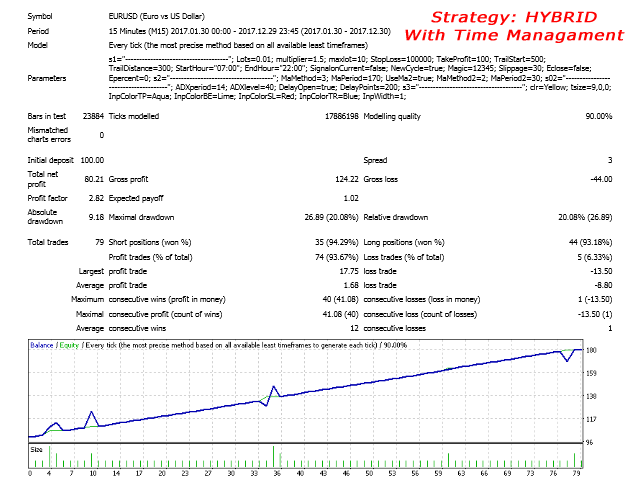
- Hybrid - A new lot opens in the direction of every new trend signal, without taking into consideration the direction of the previous order.
Example: Buy, Sell, Buy, Buy, Close
- Hedging - A new lot opens in the opposite direction from the previous trend signal.
Example: Buy, Sell, Buy, Sell, Buy, Close.
- Martingale - When the first lot was for example a Buy order, all the subsequent orders will also be long on every collaborating trend signal.
Example: Buy, Buy, Buy, Buy, Close
important
- The default settings are set for a 5 digit broker. Please adjust if necessary.
- The advisor has many faces and without proper optimization can quickly ruin your account.
- Do proper testing and optimization to determine the trade frequency and risk pertaining to your needs.
- All Time frames can be optimized
- Settings must be optimized individually for EACH strategy and currency pair.
- 5 Points=50 on a 5 digit broker.
- Make use of a broker/currency pairs with low spread.
- Withdraw profits regularly when opting for high risk parameters.
Real time monitoring of the signal and my products can be viewed at https://www.mql5.com/en/users/andre0512/seller
Basic Input Parameters
- Strategy - Hybrid/Hedging/Martingale
- LotType - Manual Lot/Auto Lot - If Auto Lot, then Start Lot is the percentage of the deposit balance
- Start Lots - Initial opening lot
- Lot Multiplier - Number by which Start Lots is multiplied on each reversing signal
- Max Lot - Maximum accepted lot size (Start Lots x Lot Multiplier)
- StopLoss - Stop Loss in deposit currency
- TakeProfit - Take profit in points
- TrailStart - Profit in points to activate trailing stop
- TrailDistance - Trailing stop in distance
- Start Hour - Trading starting hour
- End Hour - Trading end hour
- Time End Friday - Time to suspend trading on a Friday
- SignalonCurrent - True - Get signal on current (still opened) bar / False - Get signal on closed bar
- New Cycle - True/False. If false, no new trades will be opened after completion of a trade cycle
- Magic Number - Chart identification number
- Slippage - Allowed slippage
- Max Spread - Maximum allowable spread for opening a new position
- Close on Equity - True/False. When True, Equity Percent applies
- Equity Percent - When the equity has increased by this percentage, all open orders from all open charts will be closed
Trend Indicator Input Parameters
- MaMethod - 0 - Simple MA, 1 - Exponential MA, 2 - Smoothed MA, 3 - Linear MA
- MaPeriod - Period of moving average (0-200)
- Use MA2 Filter - True/False
- MaMethod2 - 0 - Simple MA, 1 - Exponential MA, 2 - Smoothed MA, 3 - Linear MA
- MaPeriod2 - 2nd Period of moving average (0-50)
ADX Indicator Input Parameters
- Period - Period of the indicator
- Applied Price
- ADX Level - Order will only open above this level
- Delay Open - True/False. When True, Delay Points will be activated
- Delay Points - Order will open when this many Points has been gained after the crossing of the ADX Level
News Settings
- UseNewsFilter - True/False. If False, News Filter is deactivated
- TimeBeforeNewsH - The number of minutes to pause trading before High impact news
- TimeAfterNewsH - The number of minutes to pause trading after High impact news
- TimeBeforeNewsM - The number of minutes to pause trading before Medium impact news
- TimeAfterNewsM - The number of minutes to pause trading after Medium impact news
- TimeBeforeNewsL - The number of minutes to pause trading before Low impact news
- TimeAfterNewsL - The number of minutes to pause trading after Low impact news
- DrawLines - True/False. If False, News lines won't be drawn on the chart



 nload="if(window.viewGallery_GalleryManager) viewGallery_GalleryManager.ImageonLoad(this,7);" />
 nload="if(window.viewGallery_GalleryManager) viewGallery_GalleryManager.ImageonLoad(this,8);" />
 nload="if(window.viewGallery_GalleryManager) viewGallery_GalleryManager.ImageonLoad(this,9);" />
本店最新上架
-
- MT4 MT5跟单EA 本地跟单远程跟单 绝不

- ¥1100.00
-
- 在MetaTrader市场购买MetaTrader 5的&#

- ¥3988.00
-
- 在MetaTrader市场购买MetaTrader 5的&#

- ¥3988.00
-
- 在MetaTrader市场购买MetaTrader 5的&#

- ¥3988.00
-
- 在MetaTrader市场购买MetaTrader 5的&#

- ¥3988.00
全网为您推荐
-
- AlgoTradeSoft

- ¥3988.00
-
- 国际期货套利软件

- ¥3988.00
-
- MT4 MT5跟单EA 本地跟单远程跟单 绝不
- ¥1100.00
-
- 在MetaTrader市场购买MetaTrader 5的&#
- ¥3988.00
-
- 在MetaTrader市场购买MetaTrader 5的&#
- ¥3988.00
-


18391752892
网站客服
法定工作日
8:30-17:30
-

了解更多外汇信息
微信扫描关注
-
用户反馈